
Van Westendorp is the standard price sensitivity question. Respondents give four prices for one product, in a fixed order: the price at which it is too cheap (they would doubt its quality), a good value, getting expensive, and too expensive to consider. Together the four answers show the range of prices people accept.
It is in the Product Questions group at the end of the question palette.
When to use it:
- Setting or testing the price of a new product.
- Checking whether a current price sits inside the range people accept.
- Comparing price expectations between customer groups.
Adding the question#
Drag Van Westendorp from Product Questions onto your survey. A new question comes with everything filled in: the four price questions with their standard wording, a price range from 0 to 100, and dollars as the currency. Write the product you want priced in the question text, for example "Think about a 1 litre bottle of Brew & Co cold brew coffee."
The question starts required: respondents must give every price it asks. To let them leave a price empty, switch off Require Answer in the Validation tab; each price they do give must still be higher than the one before. A respondent who leaves a price empty is left out of the Van Westendorp analysis in HM Admin.
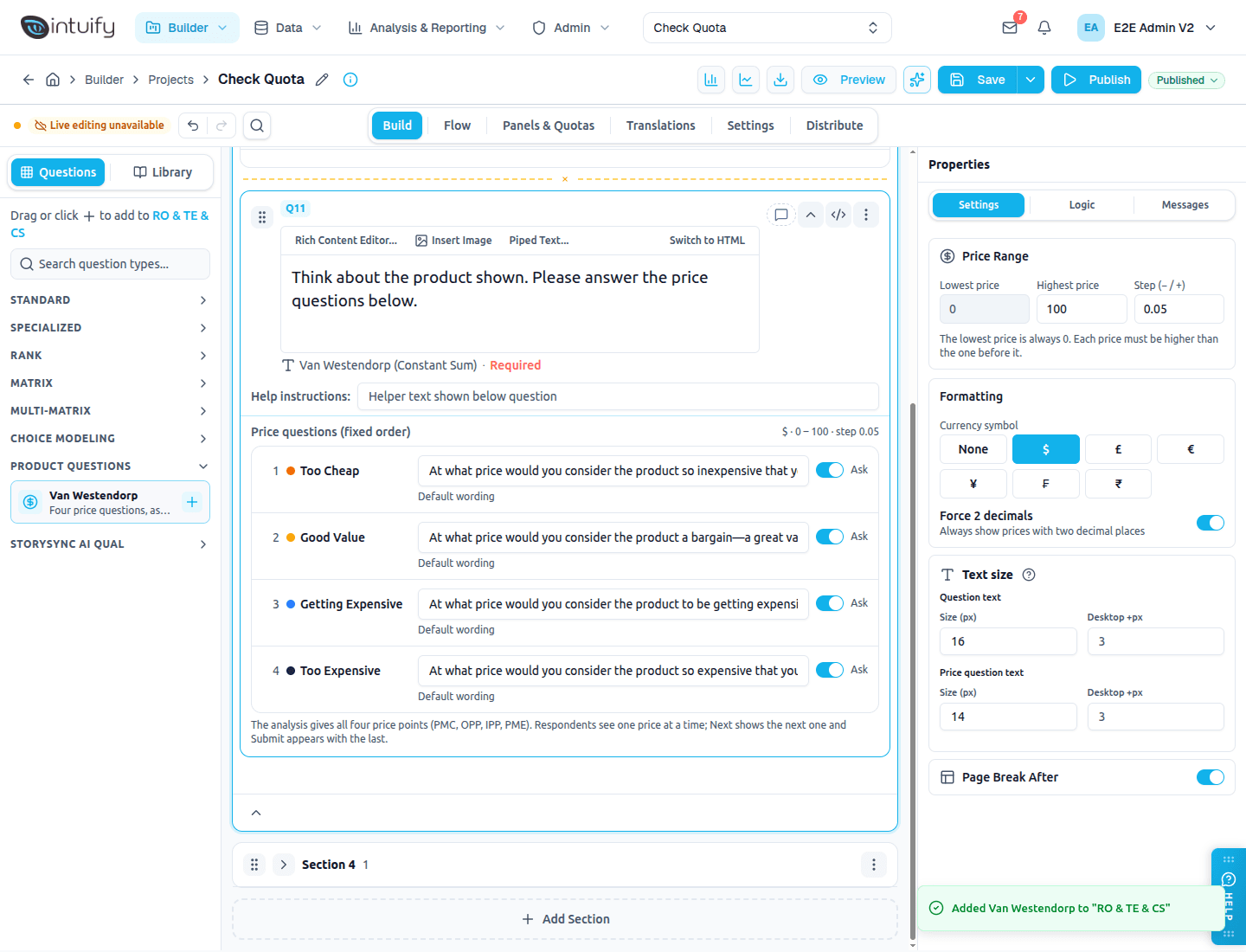
The four price questions#
The card lists the four price questions in the only order they are asked:
| Price | Default wording | |
|---|---|---|
| 1 | Too Cheap | At what price would you consider the product so inexpensive that you would question its quality? |
| 2 | Good Value | At what price would you consider the product a bargain—a great value for the money? |
| 3 | Getting Expensive | At what price would you consider the product to be getting expensive, but you might still consider buying it? |
| 4 | Too Expensive | At what price would you consider the product so expensive that you would not consider buying it? |
- Change the wording by typing in the box. A changed question is marked Custom wording; Reset to default brings the standard text back.
- Leave a price out with its Ask switch. At least two prices stay on. A note under the list tells you which of the four price points (PMC, OPP, IPP, PME) the analysis can still work out with the prices you ask.
- Set the Ask switches before the survey goes live. If you switch a price off while it is collecting responses, earlier respondents gave that price and later ones didn't; in HM Admin, set that price to Not asked in the analysis so everyone is counted on the other prices.
- Like any change, a new Ask setting reaches respondents only after you Publish.
- The four prices can't be added to, removed or reordered.
Settings#
| Setting | What it does |
|---|---|
| Highest price | The top of the range respondents can enter. The lowest price is always 0. Default 100. |
| Step (− / +) | How much the − and + buttons change the price. Default 0.05. |
| Currency symbol | Shown before every price ($, £, €, ¥, ₣, ₹ or none). Prices are stored without it; HM Admin's analysis shows the same symbol after the next sync. |
| Force 2 decimals | Always show prices like 4.50, not 4.5. On by default. |
The Messages tab holds every other word respondents see: the Next and Submit labels, the hints under the price box and the error messages.
Van Westendorp does not offer randomization, carry forward, recode values or display logic on single price questions: the prices must stay in their order for the analysis.
Its own page#
Van Westendorp always gets a page of its own, whatever your page breaks say: the questions before it end their page, and the questions after it start a new one. It draws its own Next and Submit, so it can't share a page with other questions. Nothing in your survey changes; the page is split when the survey is shown.
What respondents see#
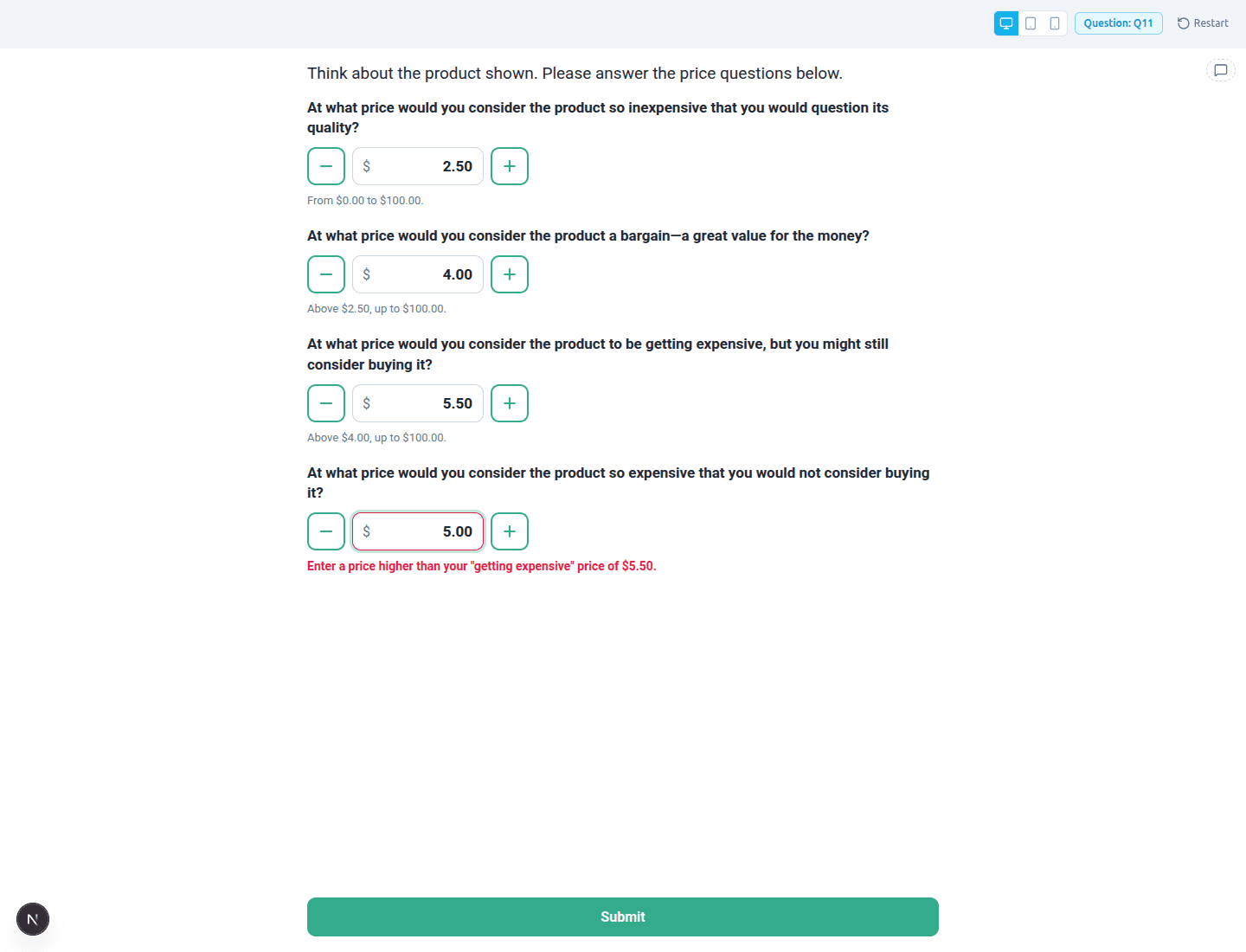
- The page opens with your question text and the first price question only. The cursor is already in the price box.
- Each price box is sized for a price, with large − and + buttons beside it. Letters can't be typed, and decimals stop at two.
- Pressing Next (or Enter) checks the price. If it is fine, the next price question fades in below with the cursor in its box. Earlier prices stay on the page and can still be changed.
- When the last price question appears, the button reads Submit.
- Each price must be between 0 and the highest price, and higher than the price before it. Otherwise a message explains what to fix, for example Enter a price higher than your "getting expensive" price of $5.50. A price you switched off is skipped, and the next one is checked against the previous price asked.
- If a respondent goes back and returns, their prices are still there.
Stored answers and exports#
Each asked price is stored as a number. In exports and in HM Admin the question looks like a Constant Sum question with four rows, numbered 1 to 4 in the order above (Too Cheap = 1 … Too Expensive = 4), each labelled with its name and wording, for example "Too Cheap: At what price would you…". A price you switched off keeps its number and is simply empty.
The analysis in HM Admin#
In HM Admin, Analysis & Reporting → Quant Analyses → New analysis → Van Westendorp draws the four curves, the four price points (PMC, OPP, IPP, PME) and the acceptable price range, for everyone and for each segment, weighted if you choose a weight. It uses the currency you set here. See the Van Westendorp guide in HM Admin for the details.
Was this page helpful?